
WhatsApp Automation
WhatsApp Automation That Replies, Qualifies and Books 24/7
Our WhatsApp automation answers every message in seconds, asks the right questions, books appointments and hands the conversation to your team when it needs a person. All on the official WhatsApp Business Platform, with customer consent built in.
★★★★★ 4.96 client rating 100+ companies 10+ years in search marketing
On this page
The problem
Customers Message You Expecting a Fast Reply
When someone taps a WhatsApp button on your ad, website or Google listing, they expect a reply in minutes, not tomorrow morning. Every hour of silence is a chance for them to message a competitor instead.
What is WhatsApp automation? WhatsApp automation uses the WhatsApp Business Platform to reply to customers instantly, ask qualifying questions with quick-reply buttons, book appointments, send reminders and log every conversation in your CRM. Linksult sets up and runs WhatsApp automation for service businesses, with a person ready to step in whenever a conversation needs one.
Messages pile up after hours
Enquiries arrive in the evening and at weekends, and wait until someone opens the phone the next day.
The same questions all day
Prices, areas, availability, opening hours. Your team answers them one by one, over and over.
Leads go quiet
A customer asks a question, gets an answer, then never hears from you again. So they book someone else.
How it works
How Our WhatsApp Automation Works
Every conversation follows a clear, tested path, at any time of day.
- New messageFrom your ad, site or listing
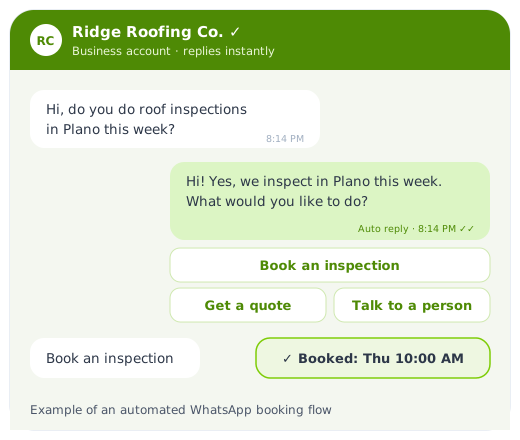
- Instant replySent in seconds, in your voice
- QualifyQuick-reply buttons collect details
- Book or quotePick a slot or request a quote
- CRM updatedContact, source and chat saved
- BookedConfirmation and reminders sent
What we set up
WhatsApp Automation Services We Set Up
WhatsApp Business Platform setup
We set up your business on the official WhatsApp Business Platform, with a verified business profile and the right phone number.
Instant replies and FAQs
Answers to the questions customers ask most, written in your voice and kept short.
Qualification flows
Quick-reply buttons collect the service, location and timing before your team gets involved.
Booking and reminders
Customers choose a time from your calendar, then get confirmations and reminders on WhatsApp.
CRM and team inbox
Every chat is saved to your CRM with its source, and your team can take over any conversation.
Opt-in updates and reviews
Review requests, service reminders and offers go only to customers who agreed to receive them.
Are your WhatsApp messages turning into bookings?
A free audit of how fast you reply, where chats stall, and which WhatsApp automations to set up first.
The rules, simplified
How WhatsApp Business Rules Work
WhatsApp protects its users from spam, so business messaging comes with clear rules. We design every WhatsApp automation to work within them.
The 24-hour window
When a customer messages you, a 24-hour customer service window opens. Inside it, you can reply freely with text, images and buttons.
Approved templates
Outside that window, businesses can only send approved message templates, such as reminders, updates and offers that Meta has reviewed.
Opt-in and opt-out
Customers must agree to hear from you, and every marketing message gives them an easy way to stop.
Costs are charged per message for certain template messages, with rates that depend on the message category and the customer’s country. Replies inside the customer service window are not charged, so most booking conversations cost very little. See Meta’s pricing page for current rates.
Popular flows
WhatsApp Automation Ideas for Service Businesses
These are the WhatsApp automations service businesses ask for most. We set up the ones that fit your business and connect them to your CRM.
Click-to-WhatsApp ad replies
People who tap your ad get an instant welcome and a few quick questions.
Missed call to WhatsApp
A caller you missed gets a WhatsApp message so the conversation keeps going.
Quote follow-up
Customers who asked for a quote get a friendly check-in while they decide.
Appointment reminders
Confirmations and reminders help cut no-shows and late cancellations.
Review requests
After the job, happy customers get a simple link to leave a review.
Seasonal check-ins
Opted-in customers hear about maintenance or seasonal offers at the right time.
Real-world flows
WhatsApp Automation Examples by Industry
The same building blocks work across trades, but every business needs its own questions, answers and booking rules. A few examples of how we set up WhatsApp automation:
Roofing and exteriors
After a storm, customers send photos of the damage on WhatsApp. The flow collects the address and photos, flags urgent leaks and offers inspection slots straight away.
HVAC and plumbing
No-heat and leak messages are tagged as urgent and routed to the on-call technician, while routine service requests get booking options and seasonal reminders.
Dental and medical clinics
New patients ask about treatments and availability, book a consultation, and receive reminders and aftercare messages through approved templates.
Legal and professional services
Enquiries get a polite reply with a few intake questions, so your team knows the case type and urgency before calling back.
If your business isn’t listed, the approach is the same: answer fast, ask only what you need, make booking easy, and pass the conversation to a person at the right moment. We map the exact WhatsApp automation flows for your business during the free audit, along with the templates you’ll need approved.
AI and your team
AI Replies, With a Person Always in the Loop
Some WhatsApp automation uses simple rules and buttons. Some uses AI to understand free-text questions. We use whichever fits each step, and always keep a clear handover to your team.
What automation handles
- Instant replies at any hour
- Common questions about services, areas and prices
- Collecting job details and photos
- Offering available booking times
- Reminders and follow-ups
What goes to your team
- Custom quotes and pricing questions
- Complaints and sensitive conversations
- Anything the customer asks a person for
- Judgement calls and exceptions
Before and after
WhatsApp Business App vs WhatsApp Automation
The free WhatsApp Business app is a good start for a sole trader. Once several people handle messages, or volume grows, WhatsApp automation on the Business Platform (often called the WhatsApp Business API) does far more.
| WhatsApp Business app | WhatsApp automation with Linksult | |
|---|---|---|
| Who can reply | One phone, a few linked devices | Your whole team from a shared inbox |
| Automatic replies | Basic greeting and away messages | Full flows with buttons, questions and booking |
| CRM | Not connected | Every chat saved with its source |
| Reminders | Sent by hand | Automatic, using approved templates |
| Opted-in updates | Limited broadcast lists | Targeted, consent-based template messages |
| Reporting | Basic message stats | Replies, bookings and drop-off by flow |
Right channel, right message
WhatsApp, SMS or Email? Use Each Where It Works
WhatsApp is the first choice for many customers, but not all. In the US especially, plenty of people still prefer a text message or email. The best WhatsApp marketing automation sits alongside your other channels rather than replacing them.
Rich conversations with buttons, photos and quick booking. Ideal for customers who message you there first.
SMS
Fast, simple and universal. Great for missed-call text back and short reminders.
Best for detailed quotes, documents and longer follow-up sequences.
We connect all three to the same CRM, so each customer hears from you on the channel they prefer, and nobody gets the same message twice. That’s part of our wider marketing automation service, built on a clean CRM setup.
Our process
From Audit to Automated WhatsApp Replies
- AuditYour channels, questions and tools
- PlanFlows, templates and handover rules
- BuildPlatform setup, flows and CRM link
- TestReal conversations before launch
- ImproveMonthly reviews of replies and bookings
FAQ
WhatsApp Automation Questions, Answered
What is WhatsApp automation?
Using the WhatsApp Business Platform to reply to customers instantly, ask qualifying questions, book appointments, send reminders and save every chat to your CRM, with a person ready to take over.
Is WhatsApp automation allowed?
Yes, when it runs on the official WhatsApp Business Platform, customers have opted in, and messages outside the 24-hour window use approved templates. We set it up that way from day one.
What is the WhatsApp Business API?
It’s the common name for the WhatsApp Business Platform, the official way for businesses to connect WhatsApp to software such as a CRM, chatbot or team inbox.
How much does WhatsApp messaging cost?
Meta charges per message for certain template messages, at rates that vary by category and country. Replies inside the 24-hour customer service window are free. Our setup and support fees are quoted separately after the audit.
Can I keep my current WhatsApp number?
Often, yes. Numbers already used in the WhatsApp Business app can usually be moved to the Business Platform. We check the options for your number during the audit.
Will automated replies feel robotic?
They shouldn’t. We keep messages short, write them in your voice, and hand the chat to a person whenever the customer asks or the question needs one.
Do my customers in the US use WhatsApp?
Many do, especially for messaging businesses they found online, but not all. That’s why we usually pair WhatsApp automation with SMS and email.
How quickly can it go live?
A first set of instant replies and a booking flow can usually go live within a few weeks, depending on business verification and template approval.
Free WhatsApp audit
Turn WhatsApp Messages Into Booked Jobs
Tell us a little about your business and we’ll review how you handle WhatsApp and other messages today, and which WhatsApp automations would make the biggest difference.
- How fast you reply to messages today
- Where conversations stall before booking
- Which flows to automate first
- A clear plan you can act on
What happens next
- We review the details you send and reply to arrange a short call.
- On the call, we look at your current messages, tools and team.
- You get a written plan for your WhatsApp automation. Free, with no obligation.
Prefer to chat? Message us on WhatsApp
