
CRM Setup Services
CRM Setup Services That Give Every Lead a Clear Next Step
Our CRM setup services give you a CRM that captures every call, form and chat, shows exactly where each lead stands, and connects to the follow-up that gets them booked. Built around how your team actually works, not a generic template.
★★★★★ 4.96 client rating 100+ companies 10+ years in search marketing
On this page
The problem
Your Leads Are Everywhere Except Where You Need Them
Most service businesses don’t lose leads because of bad marketing. They lose them in the gaps between inboxes, phones, spreadsheets and whoever happened to take the call.
What are CRM setup services? CRM setup services plan, build and configure a customer relationship management system around your business. That means a pipeline that matches how you win jobs, lead capture from every channel, source tracking, clean contact data and the automations that keep follow-up on schedule. Linksult’s CRM setup services hand you a system your team will actually use.
Leads in five places
Calls, web forms, chats, emails and texts land in different inboxes, so nobody sees the full picture.
No idea what’s working
Without source tracking, you can’t tell which ads, pages or listings bring in paying customers.
Follow-up slips
Quotes and callbacks depend on memory. When the week gets busy, good leads go quiet.
What’s included
What’s Included in Our CRM Setup Services
Every CRM setup is scoped to your services, team and tools. Most projects include the following building blocks.
Pipeline design
Stages that mirror how you actually win work, from new enquiry to booked job and paid invoice.
Lead capture from every channel
Calls, forms, chats, booking requests and WhatsApp messages create or update a contact automatically.
Lead source tracking
We connect UTM-tagged links, call tracking and form data so every lead shows where it came from.
Data clean-up and migration
We import contacts from spreadsheets or an old system, remove duplicates and standardise fields.
Automations and reminders
Tasks, follow-up sequences and reminders fire on schedule, so no lead depends on someone remembering.
Dashboards and training
Simple reports for owners, and a short training session so your team knows exactly what to do each day.
Your pipeline
A CRM Pipeline Built Around How You Win Jobs
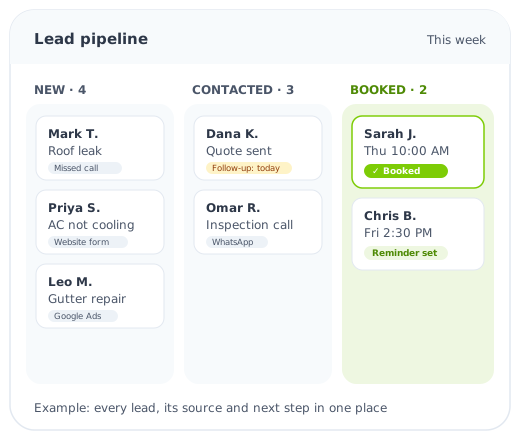
We design your stages with you, then set up the rules that move leads along. Here is a typical pipeline for a local service business.
- New leadCaptured with its source
- ContactedInstant reply sent, task created
- QualifiedJob type, area and timing confirmed
- Quote sentFollow-up sequence starts
- BookedAppointment and reminders set
- WonJob done, review requested
Not sure your CRM is pulling its weight?
A free audit of how leads are captured, tracked and followed up today, and what to fix first.
Keep it simple
CRM for Small Business: What You Actually Need
A CRM for a small business should be quick to use on a busy day. We start with the essentials and only add more when it earns its place.
Must-haves from day one
- One place for every lead and customer
- A pipeline with clear, simple stages
- Lead source on every contact
- Automatic tasks and follow-up reminders
- A mobile app your team can use on site
Worth adding once you’re ready
- Online booking linked to your calendar
- Quote and invoice tracking
- Review requests after every job
- Reactivation campaigns for old leads
- Owner dashboards by source and service
DIY or done for you?
DIY CRM Setup vs Professional CRM Setup Services
Most CRM platforms promise a quick start, and a simple contact list really is easy to set up yourself. The hard part is everything that makes a CRM useful: capturing leads automatically, tracking where they came from, and making sure follow-up happens without anyone having to remember.
Setting it up yourself
- Lower upfront cost
- Fine for a handful of leads a month
- Often stalls at importing contacts
- Lead sources and automations usually missing
- Hours of trial and error for the owner
Professional CRM setup services
- Pipeline designed around how you win jobs
- Every channel connected and tested
- Source tracking from day one
- Follow-up automations that actually fire
- Your team trained and ready to use it
If you only get a few enquiries a month and one person handles them all, a DIY setup may be enough. Once leads come from several channels or several people respond to them, professional CRM setup services usually pay for themselves in time saved and leads that no longer slip away.
Either way, the free audit is a useful starting point. We’ll look at your current lead flow and tell you plainly whether you need CRM setup services at all, or just a few changes to the tools you already have.
Results we track
What a Good CRM Setup Lets You See
Lead sources
Which ads, pages, listings and referrals bring in enquiries and booked jobs.
Response time
How quickly each new lead hears back, by channel and by person.
Pipeline value
What’s quoted, what’s waiting and what’s likely to close this month.
Booking rate
The share of enquiries that turn into appointments, by source.
Your CRM shows your real numbers. We don’t promise specific results, but we do make sure the data is accurate enough to act on.
Real-world setups
CRM Setup Examples by Industry
The building blocks are the same, but every trade needs its own stages, fields and reminders. A few examples:
Roofing companies
Storm-season leads are tagged by area and damage type, inspections are booked from the pipeline, and insurance-related jobs get their own follow-up steps.
HVAC and plumbing
Emergency jobs are flagged and routed first, while service-plan customers get maintenance reminders at the right time of year.
Dental and medical clinics
New-patient enquiries, bookings and recall dates live in one place, with reminders that help reduce missed appointments.
Law firms
Each enquiry is logged with its case type and intake answers, and consultation follow-ups never depend on someone’s inbox.
Whatever your industry, the goal is a CRM that fits your workflow on a busy Monday morning, not one that needs an admin to keep it alive.
Our process
How Our CRM Implementation Works
Our CRM implementation services follow the same six steps, whether you’re starting fresh or fixing a system you already pay for.
- AuditYour channels, tools and team
- DesignPipeline, fields and rules
- BuildCapture, tracking and automations
- MigrateClean import of existing contacts
- TrainShort sessions for your team
- SupportMonthly check-ins and changes
Before and after
Spreadsheets and Inboxes vs a Properly Set Up CRM
| Spreadsheets and inboxes | With a Linksult CRM setup | |
|---|---|---|
| New leads | Spread across email, phone and texts | Captured automatically in one pipeline |
| Lead source | Unknown or guessed | Recorded on every contact |
| Follow-up | Depends on memory | Tasks and sequences on a schedule |
| Team visibility | Ask around the office | Everyone sees the same status |
| Reporting | Hours of copy and paste | Live dashboards by source and service |
| Data ownership | Locked in personal inboxes | Your account, exportable at any time |
Already have a CRM?
CRM Clean-Up for Systems Nobody Uses
Plenty of businesses already pay for a CRM that sits half-empty. If any of these sound familiar, we can fix the setup rather than start again:
- Duplicate contacts and messy, inconsistent fields
- Pipeline stages nobody updates
- No lead source on most contacts
- Automations that fire at the wrong time, or not at all
- Calls and messages that never get logged
- Reports nobody trusts
A CRM clean-up usually starts with the same free audit. We’ll tell you honestly whether your current system can do the job, or whether moving to a better fit would save time.
Your data stays yours
The CRM account is set up in your name, with admin access for you. You can export your contacts at any time, and email follow-up includes the unsubscribe link the CAN-SPAM Act requires.
Connected to your follow-up
A CRM is the foundation, and marketing automation is what acts on it: instant replies, follow-up sequences, booking and reviews. Add AI search optimization to bring in more leads to fill it.
FAQ
CRM Setup Questions, Answered
What do CRM setup services include?
Planning your pipeline, connecting every lead source, importing and cleaning contacts, setting up tasks and follow-up automations, building simple reports and training your team.
Which CRM do you recommend?
It depends on your size, budget and the tools you already use. We often work with the CRM you already have; if you don’t have one, we recommend a platform during the audit and explain why.
How long does a CRM setup take?
A focused setup for a small team can be ready in a few weeks. Larger migrations with complex automations take longer, and we agree a timeline after the audit.
Can you move our existing contacts?
Yes. We import contacts from spreadsheets or another CRM, remove duplicates and map fields so your history comes across cleanly.
Do we need a CRM if we’re a small business?
If you get leads from more than one channel or more than one person handles them, a simple CRM usually saves time and stops leads slipping through.
Will my team actually use it?
That’s the main goal. We keep stages simple, automate data entry where we can, and train your team on the few actions that matter each day.
How much do CRM setup services cost?
It depends on the number of channels, users, automations and how much data needs migrating. The free audit maps what you need and we quote from there.
Do you offer support after setup?
Yes. Most clients keep a monthly support plan for changes, new automations and reporting reviews.
Free CRM audit
Get a CRM Your Team Will Actually Use
Tell us a little about your business and we’ll review how leads are captured, tracked and followed up today, and what a cleaner CRM setup would look like.
- Where leads are getting lost today
- Which lead sources you can and can’t track
- What to automate first
- A clear plan you can act on
What happens next
- We review the details you send and reply to arrange a short call.
- On the call, we walk through your tools, team and lead flow.
- You get a written CRM plan with recommended next steps. Free, with no obligation.
Prefer to chat? Message us on WhatsApp
